
Showing posts with label Andriod. Show all posts
Showing posts with label Andriod. Show all posts
0
Sriram PV

In this post you will learn how to create android apps using simple technologies like HTML, CSS and JavaScript. This is a very easy method for creating your own android apps. As android gives a access to install and uninstall apps without any restrictions, you can create and distribute your own android apps here after. Not only android apps, you can also create apps for Windowsphone 8, IOS and for Blackberry also by using this method.
How to create Android apps using HTML, CSS and JS
In this post you will learn how to create android apps using simple technologies like HTML, CSS and JavaScript. This is a very easy method for creating your own android apps. As android gives a access to install and uninstall apps without any restrictions, you can create and distribute your own android apps here after. Not only android apps, you can also create apps for Windowsphone 8, IOS and for Blackberry also by using this method.
Procedure:
Create a html static websites. You just need to know HTML, css and JavaScript to create a simple website. It does not matter even if you don't know these technologies. There are plenty of free HTML5 templates that are available for you to download. You can edit the webpages and you can use it for your company or for your institution.
Now go to the following link and download the zip file provided by phonegap.
Now import this source code into Android sdk.
Add a folder "www" in desktop\phonegap-android-master\src\assets.
Now remove the pre installed html files from assets folder and add your html,css and js files in folder desktop\phonegap-android-master\src\assets\www\
Now change the icon and name of the app and run it on emulator. Your webapp is now ready to distribute.
Download this eBook in case you need to know further information about creating android app using html, css and js http://it-ebooks.info/book/206/
Note: Your HTML website/pages should be mobile view compatible. Else making of these apps is of normally of no use.
0
Ravva Vamsi
10 Free Cool Google Android Apps for Communication Purpose
Hi friends today i am now posting 10 Google android apps related category of Communication which are Best Rated in android market


Communication
1. chompSMS

You love your Android phone? You SMS all the time? Then chompSMS is for you: It’s got a great user interface, chat style SMS bubbles, touchscreen keyboards and many other great features! Also coming soon, T9 predictive touchscreen keyboard and color customizations.
2. Hi AIM

AOL Instant Messenger(AIM) client for android. Data sent through network. No SMS fee. Support for smileys and chat bubble styles.

Fusion Voicemail Plus from PhoneFusion is an easy to use award winning service that lets you centralize your voicemail boxes (mobile, home, office etc.) No more calling voicemail – just Touch-N-Listen right from your phone. BETTER AND FASTER than iPhone. A must have for your Android phone!
4. Speaking Pad

Speaking Pad is a talking notepad that will speak whatever you type! IDEAL Group’s Speaking Pad is an entertaining application for anyone who wants to prank their friends with computerized speech!
5. Meebo IM

Meebo is a free IM program that supports AIM, MSN, Yahoo, MySpace IM, Google Talk, Jabber and ICQ. You can also sign in using a Meebo account and your chat history will be saved forever, and can be accessed from anywhere by logging in at www.meebo.com.
6. Steel

The web at your fingertips! Browse the internet full screen via a simple user interface with auto-rotate, a virtual keyboard, zoom and page flip gestures. You can also download files of any type. Enjoy all of your phone’s features – today!
7. Phonebook

Phonebook is a brand new user interface for viewing and managing your contacts. It displays your contacts with pictures and contextual information such as coming birthdays, missed calls and unread text messages. Phonebook comes with a nice landscape view, a dialer and a quick access to your favourites and most called contacts. With Phonebook, have fun while browsing your contacts.
8. Live Chat

Chat, flirt and discuss with other users in this Live Chat application. You can create your own chat groups and create a profile with photo. Have fun!
9. Opera Mini

Browse the entire Web on your Android phone and save time and money. Opera mini is compressing pages up to 90%, making web browsing fast. Synchronize your bookmarks, history, notes and more between your computer and mobile phone, and a lot more.
10. twidroid

Twidroid is the first full-featured twitter client application on the android platform with features like native photo posting, location support, auto-completion, a fully integrated notification system and the latest news from twitter buzz.
0
Ravva Vamsi
 If you are Android Mobile user and bored of Android’s traditional interface, or you want to change with something new. So with the help of free android app Launcher 7 you can get Windows phone 7 Home screen on your Android smartphone. Launcher 7 is quite simply a launcher that replaces your standard home screen with the sleek, tiled look of Windows Phone 7.
With the help of this Freeware android app you can change the colors of the tiles, change their icons, add or remove apps from the home screen, and even add Android widgets as their own tiles.
Follow the below Instruction to get the Windows phone 7 Home screen on your Android smartphone:-
1. Download and install : Launcher 7 app from android market.

2. After the Installation hit the Home button and Select Launcher 7.
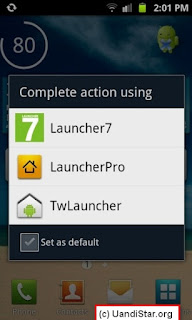
3. Now you can see the new Windows Phone 7 home Screen on your Android mobile.

4. Now you can also customize your screen and also add some more app om the screen. To add more app on the screen, press and hold on the app icon, now you can see the new option “Pin to Home Screen” Tap on it to add the app on home screen.

5. Thats it now your favorite app is on home screen, Just long press on a app tile and drag tile where you want.

Windows Phone 7 Offcial Theme for your Andriod Phone
If you are Android Mobile user and bored of Android’s traditional interface, or you want to change with something new. So with the help of free android app Launcher 7 you can get Windows phone 7 Home screen on your Android smartphone. Launcher 7 is quite simply a launcher that replaces your standard home screen with the sleek, tiled look of Windows Phone 7.With the help of this Freeware android app you can change the colors of the tiles, change their icons, add or remove apps from the home screen, and even add Android widgets as their own tiles.
Follow the below Instruction to get the Windows phone 7 Home screen on your Android smartphone:-
1. Download and install : Launcher 7 app from android market.

2. After the Installation hit the Home button and Select Launcher 7.
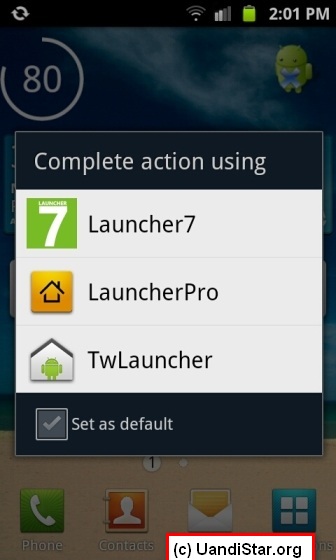
3. Now you can see the new Windows Phone 7 home Screen on your Android mobile.
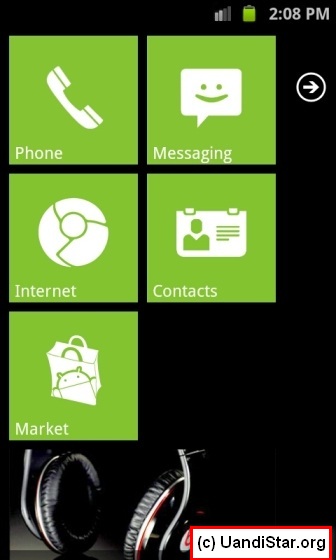
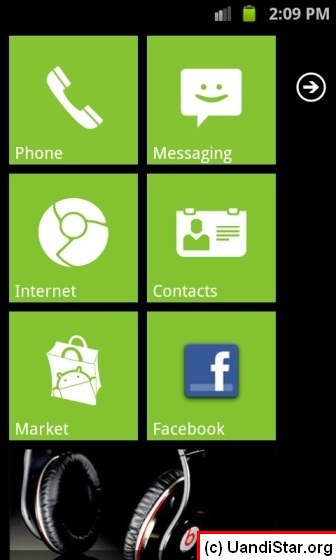
4. Now you can also customize your screen and also add some more app om the screen. To add more app on the screen, press and hold on the app icon, now you can see the new option “Pin to Home Screen” Tap on it to add the app on home screen.

5. Thats it now your favorite app is on home screen, Just long press on a app tile and drag tile where you want.
Subscribe to:
Posts (Atom)


